|

E-mail
control panel and Check available site space
To
use your e-mail control panel, enter this address into your browser:
http://www.yoursite.co.uk/siteadmin
You will then be prompted for your username and
password.
- For
e-mail changes, select the 'user management' option and click
on the envelope icon shown next to your username...
- To
check the amount of space your site is currently using, select
the 'disk useage' icon, or select 'web useage' and then 'disk'
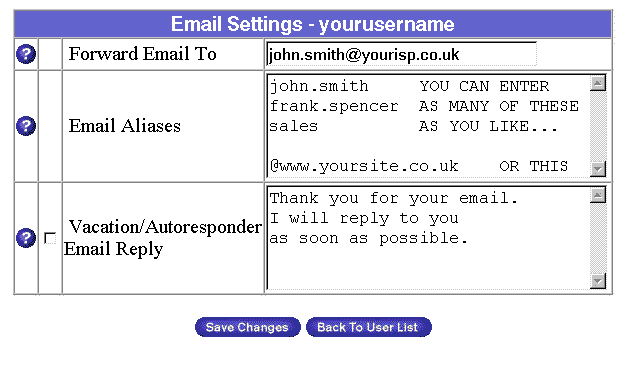
- Enter your own e-mail address for forwarding
into the first box - e.g. john.smith@yourisp.co.uk
- EITHER: Enter the individual e-mail
addresses you want to be operative on your account into the
second box - e.g. john.smith, sales, admin etc etc. You can
enter as many as you like - just put each on a new line.
- OR Enter @www.yoursite.co.uk
to collect all e-mail i.e. anything@yoursite.co.uk
- To use your autoresponder, enter the
text in the box and click the check-box to the left.
|



